


Empower Driver
4.8522.00 Reviews
App Specs
- Version
- 2.19.4
- Updated On
- License
- Free
- Downloads
- 100,000+
- Developer
- Yazam Inc
- Categories
- Travel & Local
- Platform
- Android
Screenshots
 Analysis by AppCompare
Driving for a rideshare platform can feel like working inside someone else’s system: the company sets the rules, the app decides how requests appear, and the driver is expected to adapt. Empower Driver takes a different position. Its central idea is that drivers are treated as the customers, and that changes the way I look at this travel and local app. Rather than presenting itself as a passenger booking tool, it is built around the driver’s side of the experience.
I reviewed it as an app for people who want to understand whether a driver-focused service fits their working style, not as a general navigation replacement. That distinction matters. If you simply need directions, a conventional map app is likely more suitable. If you drive passengers and want an app designed around your role, Empower Driver deserves a closer look.
A driver-first idea with a practical effect
The most important capability here is the app’s driver-centered approach. Yazam Inc developed Empower Driver for the person behind the wheel rather than for the passenger sitting in the back seat. In everyday use, that focus affects what feels important: the driver’s time, attention, route decisions, and ability to decide whether a trip makes sense.
I found this more meaningful than a slogan because it gives the app a clear purpose. Many transport apps make drivers feel like one part of a larger marketplace. Empower Driver instead frames the driver as the customer. That does not automatically make every trip easier, but it gives the service a more understandable point of view.
The app is free, which lowers the barrier to trying it. It is also rated for Everyone, so its presentation is not aimed at a narrow age group. The Android release supports devices running Android seven point zero or later, and the current version is 2.19.3. Those details make it accessible to people who may not be using a brand-new phone.
Its reception is encouraging: Empower Driver has a 4.8 average from around 3.3 thousand ratings, with roughly 520 written reviews and more than 100 thousand installs. I would not treat those figures as a guarantee that the app will suit every driver, but they do suggest that the driver-first concept has found a real audience.
What this focus changes for the driver
The benefit of a driver-oriented app is not necessarily that it replaces every other tool. The stronger benefit is that it encourages you to judge the driving experience from your own side. Before accepting a request, a driver naturally thinks about distance, traffic, timing, destination, fuel, and the effect on the rest of the working day. A service that recognizes those concerns feels more relevant than one designed mainly to maximize passenger convenience.
Worth Reading Before You Choose

EA SPORTS FC Mobile 26 Is a Bigger Football Game, but It Takes Time

Flipboard Shows What News Apps Must Do Beyond the Feed

Switching to Android Auto Means Rethinking Your Driving Routine

Google Calendar Makes a Crowded Week Easier to Manage

Ludo King Makes the Most of the Minutes Between Plans

Baby Panda World Brings Quick Play to Modern Phones, but Its Game Library Feels Busy
That is especially useful for part-time drivers. Someone driving after work or during selected hours does not have unlimited time to experiment with every request. A driver-first workflow can make the decision process feel more deliberate. Instead of treating every incoming opportunity as equally valuable, I would use Empower Driver as part of a broader routine: check the request, consider the practical cost of taking it, and keep control of the shift.
There is also a psychological advantage. Drivers often switch between navigation, communication, and transport apps, and that can make the phone feel like a supervisor rather than a tool. Empower Driver’s identity is clearer. It is intended to support the driver’s role, not simply to move a passenger from one address to another.
How I would use it during a real shift
A realistic example is a weekday evening when I have about an hour available after finishing another commitment. I would open Empower Driver before starting, make sure the phone is ready, and use the app as the driver-facing part of my work rather than relying on memory or informal decisions. The key is to begin with a plan: how long I want to drive, which areas are practical, and when I need to stop.
When a request appears, I would avoid making a rushed decision simply because I am already on the road. The driver-first perspective is most useful when I pause long enough to think about the complete trip. A short passenger ride can still become inconvenient if it takes me far from the area where I want to continue. Likewise, a longer trip may be worthwhile in one situation and unhelpful in another, depending on traffic, timing, and where I need to be next.
This is one of the less obvious ways to get value from the app: use it as part of a shift strategy, not just as a button for accepting rides. Drivers who make decisions one request at a time can lose sight of the next hour. I would keep a simple mental boundary around the session and evaluate each trip by how it fits that boundary.
Another useful habit is to prepare the phone before moving. I would set the device where it can be viewed without constant handling, check that the battery is sufficient, and avoid changing settings while driving. The app may be driver-focused, but no driving app removes the need for safe phone use. Its usefulness depends on fitting into a careful routine rather than encouraging more screen interaction.
Where it fits beside navigation apps
I would not treat Empower Driver as a complete substitute for a dedicated navigation app. Navigation tools are usually better when I need detailed route planning, traffic context, saved places, or a familiar map interface. Empower Driver’s more specific role is to support the driver’s participation in the transport service.
That division can actually be an advantage. A driver may use Empower Driver for the work-facing experience and a separate map tool for directions. The trade-off is that switching between apps can create friction, especially when a request arrives while the driver is already checking a route. I would only use a second app when parked or when the phone setup makes the information easy to consult safely.
Compared with a passenger-oriented ride service, the difference is more fundamental. Passenger apps tend to emphasize booking, pickup, and the rider’s confidence. Empower Driver is more relevant when the question is whether the driver’s time and working preferences are being respected. It is not necessarily the best choice for someone who only wants a simple way to request a car, because that is not the role it appears designed to serve.
Compared with driving independently without a dedicated service, the app offers a more structured way to approach passenger work. The cost of that structure is dependence on the app’s workflow and the conditions of the service in the driver’s area. I would check local availability and practical suitability before building an entire income plan around it.
The best scenario for Empower Driver
The strongest use case is a driver who wants flexibility and prefers to make informed choices rather than follow a rigid routine. This could be someone driving part time, someone testing whether passenger work fits their schedule, or an experienced driver who is tired of tools that seem designed mainly around the rider.
It is particularly appealing when the driver has a clear personal objective. For example, I might want to drive only during a defined evening window, stay within a familiar area, or avoid letting one request disrupt the rest of my plans. The driver-first concept gives me a better mental framework for those decisions than a generic transport app would.
A second strong scenario is a driver comparing services. Instead of asking only which platform has the most visible demand, I would also ask which one gives me a working experience I can tolerate. Empower Driver’s emphasis on drivers being customers makes that comparison more balanced. Earnings are important, but so are control, clarity, and the amount of effort required to manage a shift.
There is a useful trade-off here: a driver who values autonomy may appreciate the app more than someone who wants the platform to make every decision automatically. Empower Driver’s appeal is connected to that preference. The more I want to think about where, when, and why I drive, the more relevant its central idea becomes.
A practical routine for part-time drivers
Before starting, I would decide the maximum time available and the areas that make sense for the day. I would then keep the app ready, avoid unnecessary multitasking, and review each request in relation to the whole session. After a few trips, I would reflect on whether the app is helping me work in a way that feels organized or whether it is adding another layer of management.
This routine reveals an important point: the app cannot create a good driving plan by itself. It can support a driver-first mindset, but the driver still has to set boundaries. If I begin without knowing when I need to stop, I may accept trips that leave me rushed. If I keep changing between several apps, I may create distraction. The best results come from using Empower Driver as one part of a disciplined setup.
For a new driver, I would begin with short sessions rather than immediately treating the app as a full-time solution. That gives enough time to learn how the workflow fits personal habits, phone performance, and local driving conditions. It also makes it easier to identify whether the service is genuinely convenient or merely attractive in theory.
Trade-offs I would consider before installing
The first limitation is that a driver-focused concept does not guarantee a frictionless experience. Any app used while working on the road has to compete with navigation, calls, battery limits, and the driver’s attention. Even a well-designed workflow can feel demanding when the phone is busy and the street is crowded.
The second issue is fit. Empower Driver makes most sense to someone who is actually interested in driving passengers through its service. If I only need directions, local recommendations, or public transport information, I would choose an app built for that purpose. Installing it simply because it belongs to the Travel and Local category would not be a good reason.
I would also be cautious about assuming that a strong rating means universal satisfaction. A 4.8 average is a positive signal, but drivers have different schedules, vehicles, neighborhoods, and expectations. A person who wants complete automation may prefer another option. Someone who wants to compare several driving services may need more than one app to make a fair decision.
Another trade-off is the possibility of managing multiple tools. If I use Empower Driver alongside navigation and communication apps, I need a phone arrangement that keeps the important information visible without constant tapping. This is not a flaw unique to this app, but it matters more for drivers because the cost of distraction is higher than it is for someone browsing a travel guide at home.
The free price is helpful for testing, but free installation should not be confused with zero working cost. Driving still involves fuel, vehicle wear, time, and the opportunity cost of accepting one trip instead of another. I would evaluate the app by whether it improves my decisions and routine, not merely by whether I paid to download it.
When another option may be better
I would choose a conventional map app when the main task is reaching a destination efficiently. I would choose a passenger booking app when I am arranging a ride for myself or someone else. I would also consider a different driver platform if its local coverage, workflow, or working terms fit my schedule better.
Empower Driver is not the right choice for a person looking for a broad travel companion with hotel planning, sightseeing ideas, or public transport maps. Its value is narrower and more practical. That narrowness is a strength for drivers, but it limits its usefulness outside the driver’s seat.
I would also skip it if I dislike making decisions during a shift. The app’s driver-first identity is most helpful to people who want to evaluate their work rather than simply follow whatever appears next. If I want the service to remove every judgment call, another platform may feel easier, even if it gives me less sense of control.
Who gains the most from this app
The best match is a driver who sees time and flexibility as important parts of the job. Part-time drivers, people testing passenger work, and experienced drivers comparing services can all find a clear reason to try it. The app’s free access makes that trial less intimidating, while its broad age rating and Android compatibility make it practical for a wide range of users.
I would recommend it most strongly to someone who wants to feel like a participant in the service rather than a passive worker inside it. That does not mean every decision will go the driver’s way. It means the app starts from a more driver-aware premise, and that premise can influence how thoughtfully I approach each request.
It may be less suitable for drivers who want a single all-in-one dashboard, detailed navigation, or a highly automated experience. Those users may prefer a platform with broader built-in tools, even if its driver perspective feels less central. Empower Driver is better for someone willing to combine a focused driver app with sensible habits and, when needed, another navigation tool.
After using it, my view is that its main strength is not a flashy extra feature but a clear change in priorities. The phrase “drivers are our customers” becomes useful when it helps me judge a shift from my own position: my time, my route, my attention, and my reason for driving. That driver-first capability is the real reason to try Empower Driver, not the category label or the download count.
Developed by Yazam Inc and available free of charge, it is a focused choice rather than a universal travel app. I would install it if I were driving passengers and wanted a service that takes the driver’s perspective seriously. I would skip it if I only needed navigation or passenger booking. For the right user, that distinction is exactly what makes the app worth considering.
Pros
- Clear trip details help drivers prepare before accepting a ride.
- Built-in navigation support makes reaching pickup points more convenient.
- Earnings information helps drivers track their daily performance.
- Driver-focused tools simplify managing rides while on the road.
- Regular status updates keep drivers informed about active bookings.
Cons
- Availability and features may vary depending on your city or region.
- The app depends heavily on a stable internet and GPS connection.
- Battery usage can increase during long shifts with navigation enabled.
- Some drivers may find the interface crowded during busy periods.
- Support response times may vary when resolving account or trip issues.
FAQs for Empower Driver
What is Empower Driver, and who is it designed for?
Empower Driver is the driver-facing app for the Empower rideshare platform. It is designed for eligible drivers who want to accept trip requests, manage their availability, navigate to pickup and drop-off locations, and track their driving activity from a mobile device. Before downloading, drivers should confirm that Empower operates in their city and review the local eligibility, vehicle, licensing, insurance, and background-check requirements.
What requirements must I meet to drive with Empower?
Requirements can vary depending on your location, but drivers generally need a valid driver’s license, appropriate vehicle registration and insurance, a qualifying vehicle, and a smartphone with a reliable internet connection. Empower may also require identity verification, background screening, vehicle inspections, and other local documents. It is best to check the current requirements inside the app or on Empower’s official driver information page before applying.
How does Empower Driver work when accepting trips?
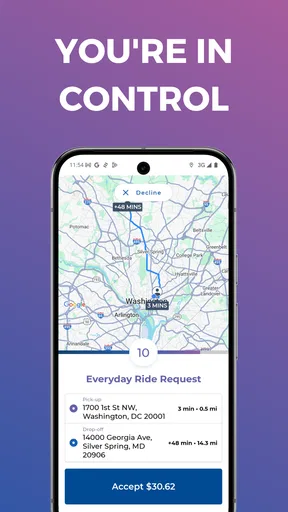
After completing registration and approval, you can typically switch your driver status to available and receive nearby ride requests. The app provides information such as pickup details, estimated route, and trip destination, allowing you to accept or decline according to the platform’s rules. Built-in navigation or integration with a navigation service can help you reach passengers, although drivers should always follow local traffic laws and use safe driving practices.
How are earnings and payments handled in Empower Driver?
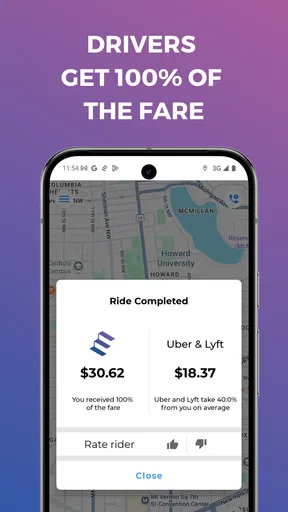
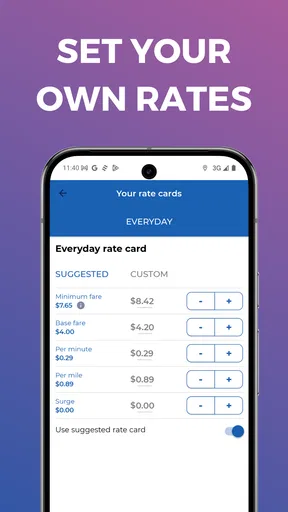
Empower Driver is intended to let drivers review trip activity and monitor earnings through the application. The exact fare structure, service fees, incentives, cancellation policies, and payment schedule may depend on the city and the driver’s agreement with Empower. Because rates and payout procedures can change, prospective drivers should carefully read the current earnings information, payment terms, and any applicable tax responsibilities before relying on the app for income.
Is Empower Driver free to download, and what should I know about privacy or technical issues?
The app may be free to download, but using it requires mobile data, location services, and an approved driver account. Location access is important for receiving trips and navigation, while background activity and notifications may affect battery life and data usage. Drivers should review Empower’s privacy policy to understand how location, identity, trip, and payment information is handled. If the app crashes or fails to connect, update it, check permissions, and contact official support.


